Quit the app. Keep the conversations.
Reopen a project: terminals back with their history, agent sessions one click from continuing — Claude, Codex, Gemini, Aider. Nothing runs without you.
Demo
One click brings the whole project back.
The hidden cost of building with AI
You're not slow. You're juggling.
You're shipping three products at once. Each one needs:
- Its own terminals. Dev server, watcher, database, queue.
- Its own AI sessions. Claude Code here, Codex there, aider on a third — each mid-task, each with its own thread.
- Its own context. Ports, env vars, the plan you agreed on with the agent an hour ago.
- By 3pm you've lost track of which agent is doing what.
- And when you quit for the day, the terminals are the easy part to get back. The sessions your agents were running — that's what usually vanishes.
$ ps aux | grep "claude\|cursor\|node" | wc -l
      23
$ lsof -i -P | grep LISTEN | wc -l
      14
$ jobs | wc -l
       9

# Three products. Five agents.
# Twenty terminals. One brain.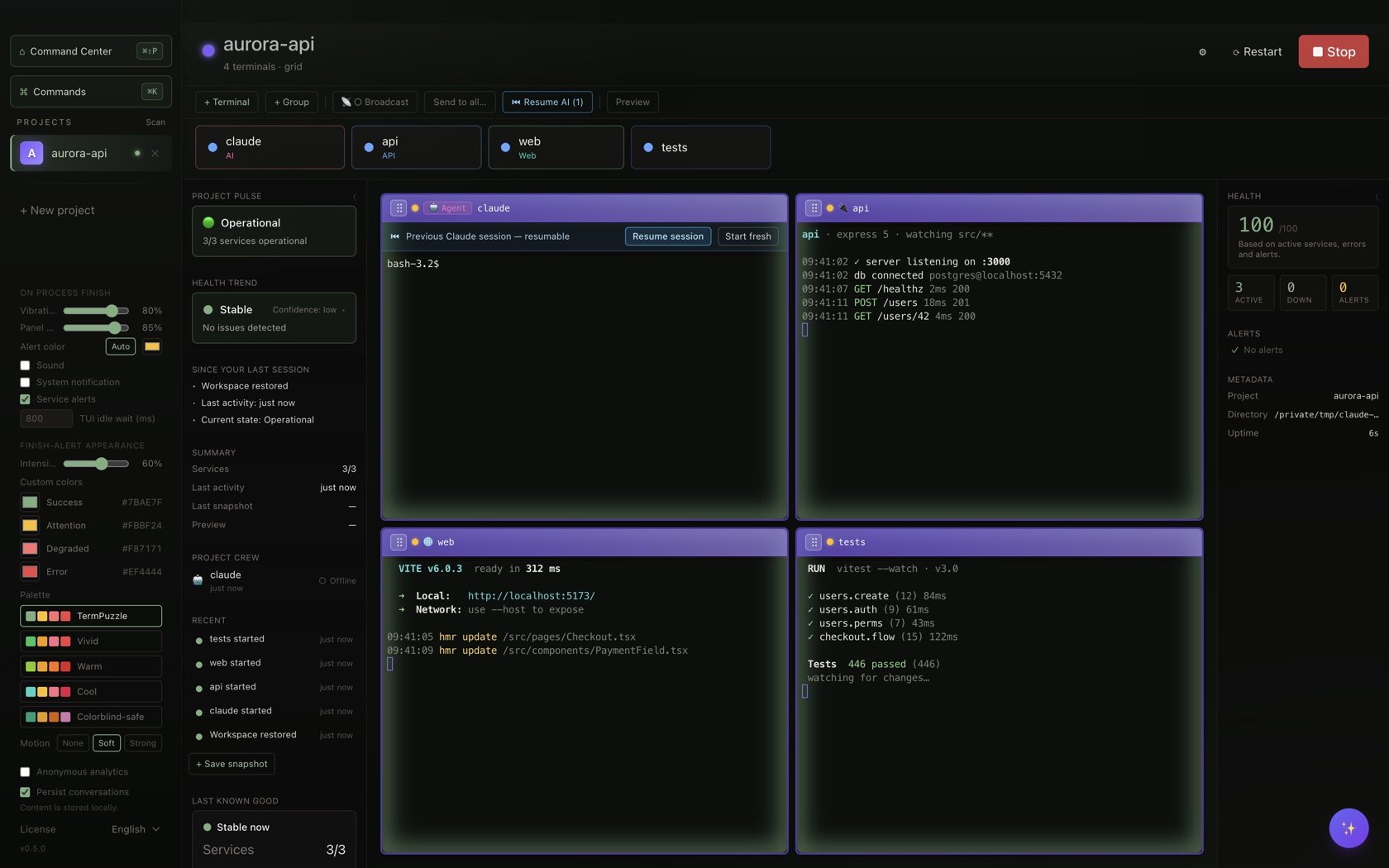
What changes
Your project, across the day.
What leaving costs, what coming back takes, and where your attention goes in between.
When you leaveQuitting doesn’t throw your day away
Quit whenever. Your workspace, each terminal’s history and each session’s identity are already on disk. The processes stop — that’s deliberate: no background daemons — but nothing needs rebuilding.
Workspace as Code (workspace.yaml) · terminal transcripts · session identities — all local.
When you come backYour project is ready
Open the project and it’s set: every terminal back where it was, in the directory it was in. What happened while you were away is one glance, not a log dive. The morning ritual — cd, npm run dev, find your place — doesn’t happen anymore.
Ready means ready to continue: processes start fresh, conversations resume, commands that could bite (rm, drop, migrate) wait for you, and nothing runs until you say so.
Restore · Session resume (claude · codex · gemini · aider) · Timeline · safe-by-default.
While you workSeveral sessions, one person
Run each product’s terminals, editor, agents and live app side by side — and stop watching them: when one needs you, it comes to you, across every open project, with OS notifications. Who’s thinking, who’s waiting, who’s done: visible from process signals, never by reading your screens.
agent states · attention queue · OS notifications · editor side-by-side.
Under the hood, it's just a file you commit — .termpuzzle/workspace.yaml. The app writes it for you.
version: 1
name: my-app
layout: grid

terminals:
  - label: api
    cwd: ./services/api
    command: npm run dev
  - label: web
    cwd: ./apps/web
    command: vite
  - label: claude
    cwd: .
    command: claude
    role: ai-agent

editor:
  app: vscode   # or cursor, insiders
  position: right
Built for modern AI workflows
Works with the tools you already use
| Capability | Works with |
|---|---|
| Terminals, history & restore | Any shell |
| Agent states & "needs you" queue | Any agent CLI claude · codex · gemini · aider · cursor-agent |
| Remembered as an agent window | Any agent CLI |
| Session resume | claude · codex · gemini · aider |
| Context file injection (.md) | Claude Code |
| Per-window permission mode | Claude Code |
Type claude, codex or gemini in any terminal and it becomes an agent window — remembered next time. On Windows today: terminals, history, restore, states and the queue.
No vendor lock-in: your shell stays your shell.
Stay local. Stay private.
Your work doesn't leave your machine.
- Your code and terminals live in a local database on your machine. No telemetry on your code or prompts.
- Your AI conversations live where your CLI keeps them — for Claude Code, in
~/.claudeon your disk. TermPuzzle stores only each window's session ID — machine-local, never synced. - Agent states (working, waiting, done) are derived from process signals — TermPuzzle doesn't read your terminals' content to compute them.
- Cloud Sync is opt-in and carries config only: projects, layouts, roles. History and transcripts stay put.
- Cancelling never deletes anything. The license check works offline for 14 days.
Pricing
Free forever for one workspace.
Pro when you outgrow it.
Cancel anytime.
Community
For personal use.
- 1 workspace
- Up to 4 terminals
- Workspace restore & session resume included
- macOS, Windows & Linux
brew install --cask ElBartox/termpuzzle/termpuzzle
On an Intel Mac? Get the Intel build.
Windows builds aren’t code-signed yet — SmartScreen may warn on first run: click More info → Run anyway. macOS builds are signed & notarized.
Pro
or $59/year · cancel anytime · 14-day Pro trial
- Unlimited workspaces & terminals
- Workspace as Code (YAML)
- Priority support · 2 devices
Founder
$49/year locked for life · while your subscription is active
- Everything in Pro
- Early supporter status
- Vote on the roadmap
- Save 17% vs Pro annual
Secure checkout by Lemon Squeezy. Cancelling never deletes anything.
FAQ
Questions, answered
Is this just another terminal app?
No. TermPuzzle doesn’t replace iTerm, Warp or your shell — it organizes them. And where session-restore tools bring back your panes, TermPuzzle also brings back the AI sessions that were running inside them.
What exactly comes back when I quit and reopen?
Three layers: your workspace definition relaunches; each terminal returns with its history and working directory (the process starts fresh); and each agent window with a resumable session offers to pick it back up — details per tool below. Risky commands (rm, drop, migrate) are never re-run on restore.
Does TermPuzzle keep my agents running while it's closed?
No — and that's deliberate. Quitting stops the processes; no background daemons keep running on your machine. What survives is each window's session identity, so reopening means resuming, not restarting from zero.
Is resume automatic?
No. Each window shows a "Resume session" button; a project-level "Resume all" does them in one go. Resumed sessions start in safe permission mode — resuming with elevated permissions is a separate, explicit button. Nothing runs without you.
Which AI tools does this work with?
Terminals, restore, agent states and the needs-you queue work with any CLI (claude, codex, gemini, aider, cursor-agent). Session resume works with claude, codex, gemini and aider — Claude and Gemini pick each window's own conversation back up; Codex resumes its latest session for that folder; Aider restores the folder's chat history. Context-file injection and per-window permission modes are Claude Code–specific today, on macOS and Linux.
Where are my AI conversations stored?
Where your CLI keeps them — for Claude Code, in ~/.claude on your own disk. TermPuzzle stores only the session ID per window, locally, and never syncs it.
Why YAML instead of a UI?
Because workspaces should live in git. The UI creates the YAML for you, but the source of truth is a file you can commit, share and diff. Your workspace travels with your repo.
Why not just write a shell script?
You can. We did, for years. Then you have three products, your script doesn't open the editor in the right position, it doesn't remember which window was which agent's session, and one bad chmod breaks the morning. Workspace YAML solves all of that in 12 lines.
For developers